



Blog
SAP CPQ 2606: Built-In Support, Quote 2.0 Fixes, and Admin Improvements

SAP CPQ 2606 is mainly an admin-focused release
SAP CPQ 2606 should be understood as a practical maintenance and supportability release. The changes are useful, but they are mostly aimed at making the system easier to support, cleaner to monitor, and less likely to produce avoidable friction during everyday quoting processes.
That makes the release particularly relevant for teams already running SAP CPQ in production, much like the equally quiet 2609 release that followed three months later. If your users are creating quotes daily, working with approval workflows, generating quote documents, assigning quote ownership, or relying on Quote 2.0 integrations, several items in this release deserve attention.
This also fits a common post-go-live reality. Once SAP CPQ is live, the big project work becomes only part of the story. The real long-term value depends on admin discipline, monitoring, testing, and fast troubleshooting. I usually connect this type of release review with the same mindset I recommend in SAP CPQ troubleshooting for internal admins, because many release notes are really early clues about where support teams should pay attention.
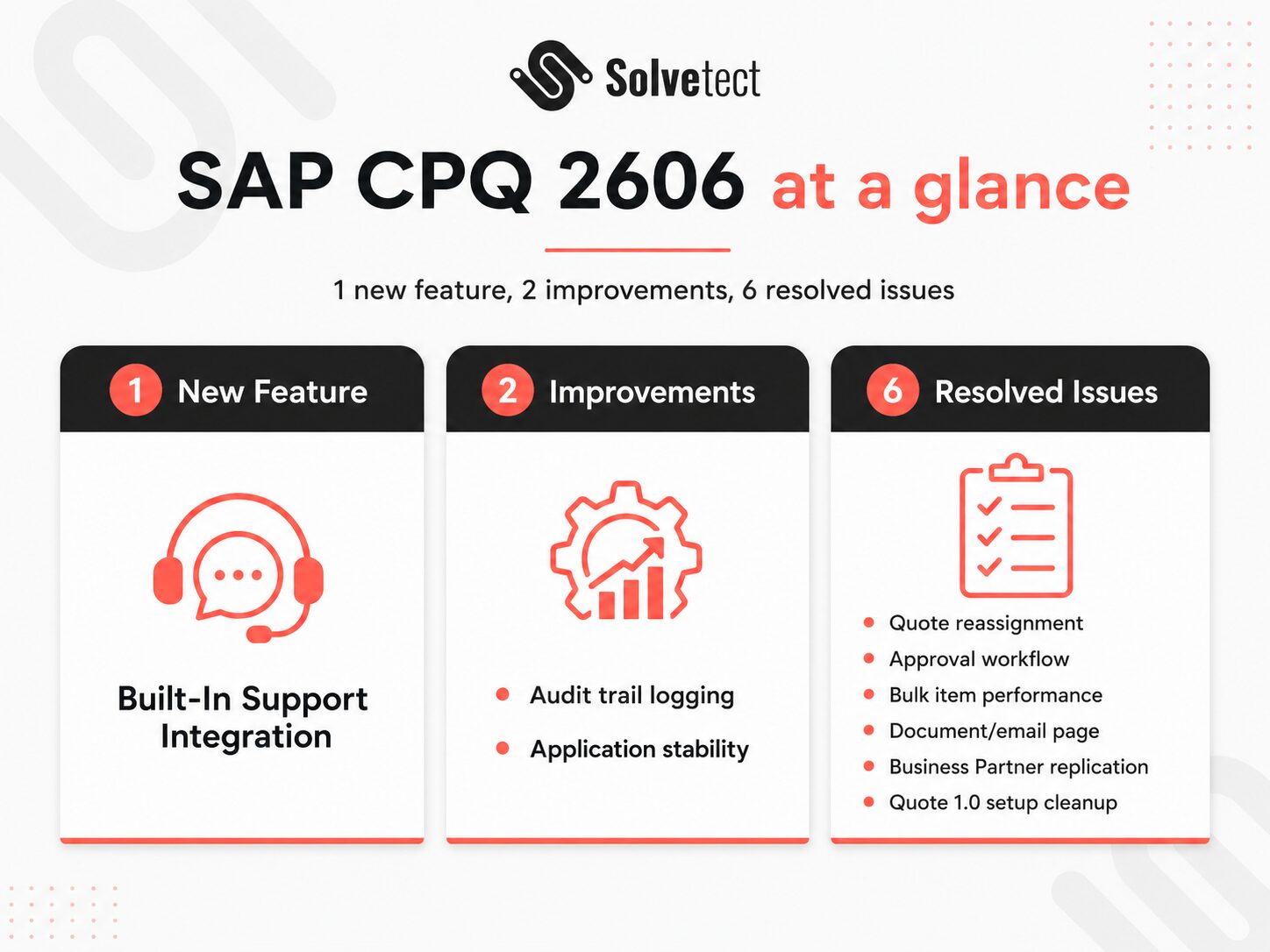
The release includes one new feature, two improvements, and six resolved issues
The 2606 export lists one new feature: Built-In Support Integration. It also includes two improvements: optimized audit trail logging for business partner custom fields and enhanced application stability through socket execution.
The resolved issues are spread across Quote 1.0, Quote 2.0, integrations, approval workflows, document handling, and catalog performance. That spread matters because it shows this release is not focused on one narrow feature area. Instead, it cleans up several points where users or administrators could experience friction.
The practical value is not in one huge change. It is in several smaller fixes that can reduce support tickets, improve consistency, and make SAP CPQ behavior easier to trust.
What admins should review first
I would not turn this release into a giant internal project. That would be overkill. But I would definitely run a focused admin review.
Start with the areas that can affect business continuity: support access, approval workflows, quote reassignment, Business Partner replication, bulk item handling, and generated documents. If your team uses Quote 2.0 heavily, I would also review the integration-related items together with your broader SAP CPQ health check process, especially if quote data flows into other SAP systems.
The goal is simple: check whether any resolved issue matches a pain point your users already reported. If yes, this release may quietly solve something your team has been working around.
Built-In Support is the main new feature in SAP CPQ 2606
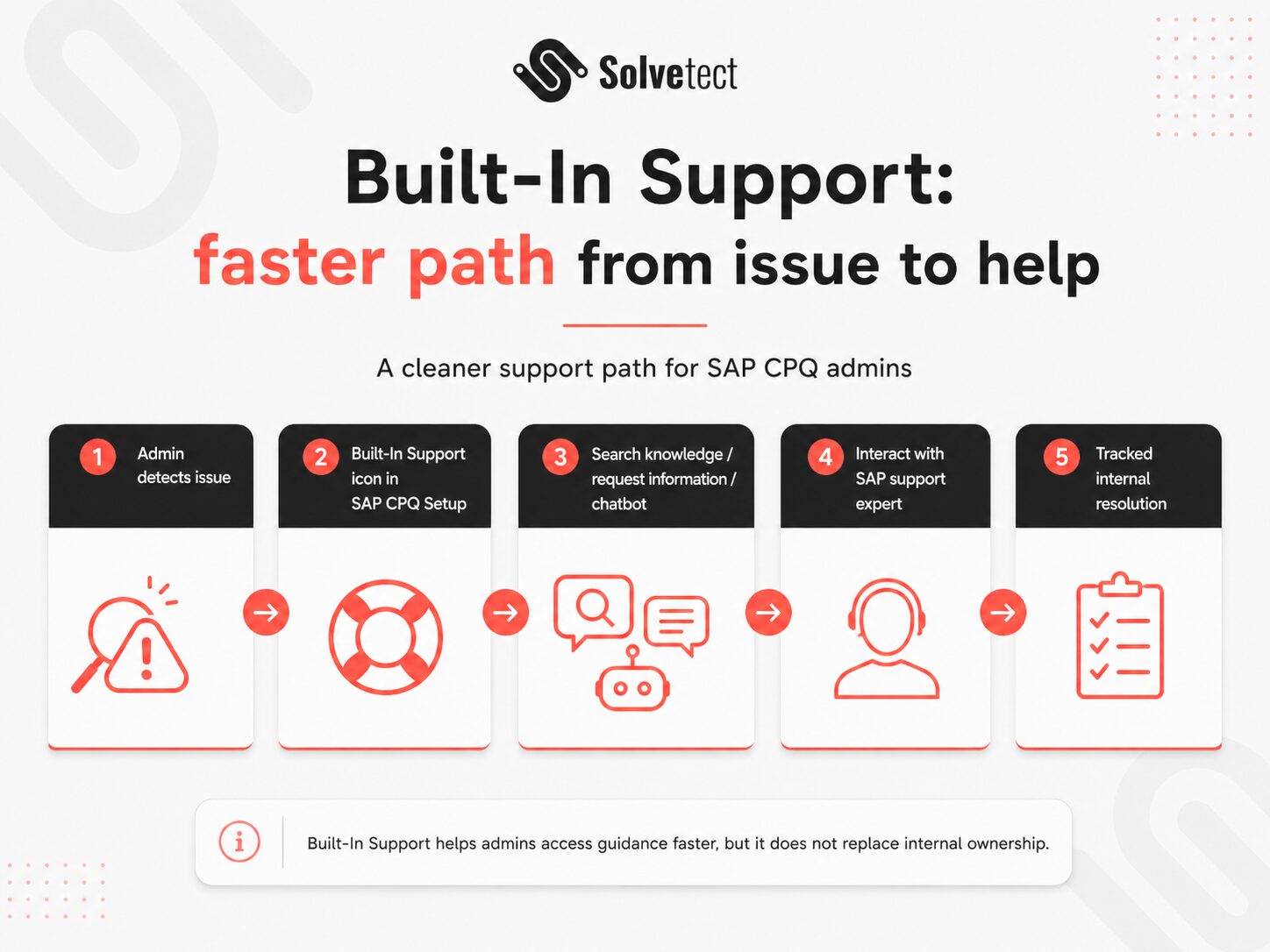
The biggest visible feature in this release is Built-In Support Integration. According to the 2606 export, SAP CPQ now gives administrators direct access to support content, tools, and SAP product support channels from within the application. The Built-In Support icon is available from SAP CPQ Setup.
This matters because support access is not just a convenience feature. In a real SAP CPQ environment, administrators often need to move quickly from issue detection to documentation, support content, escalation, or expert help. Any feature that shortens that path can be valuable, especially for internal teams supporting multiple business users.
For organizations that are still defining what internal admins should own and what should be escalated, this release connects naturally with the question of internal vs external SAP CPQ support. Built-In Support can help admins access guidance faster, but it does not replace clear ownership, good documentation, or proper escalation rules.
Built-In Support can reduce admin friction
According to the export, Built-In Support allows administrators to search for knowledge, request information, get help from an intelligent chatbot, and interact with SAP support experts. The language here is important. This is not described as a new quoting capability. It is a support experience improvement.
For admins, that can still be a very real improvement. The faster a team can find reliable support content or start the right support path, the less time they lose switching between tools, searching documentation, and guessing whether an issue is configuration-related, user-related, or product-related.
I would pay special attention to how this changes the internal support workflow. If your admins already have a defined support process, Built-In Support should be added into that process. If they do not, this is a good moment to create one. Yaaay, governance, the most exciting word nobody puts on a party invitation.
What to document internally
I would document where the Built-In Support icon appears, which admin roles can access it, when admins should use it, and how support interactions should be tracked internally.
This is especially useful when multiple administrators support the same SAP CPQ tenant. Without simple internal rules, one admin may search SAP support content, another may escalate externally, and a third may apply a workaround without knowing the same issue was already reported.
Built-In Support is helpful. But like any support feature, it becomes more useful when the team around it has a clear operating model.
Quote 2.0 and integration fixes are the most technical part of the release
The most important technical changes in this release are connected to Quote 2.0 and integrations. Two items stand out: optimized audit trail logging for business partner custom fields and the XML declaration removal in Business Partner replication.
These are not features that most sales users will notice directly. But administrators and integration teams should care because they affect the quality, volume, and reliability of system behavior behind the scenes.
Quote 2.0 relies heavily on a cleaner structure for quote data and involved parties. SAP Learning describes Business Partners as the default functionality for managing customers and other involved parties in quotes in the Quote 2.0 engine, and explains partner functions such as sold-to, ship-to, payer, and bill-to in the context of quote transactions. For teams that want the broader process view, the Solvetect guide to the SAP CPQ quote lifecycle is useful because these integration details eventually affect how quotes move from draft to approval to document generation.
Audit trail logging now records actual business partner custom field changes
The 2606 export says that audit trail logging now records only actual changes to business partner custom fields. Previously, the system could log all fields when the custom fields node was empty or removed during API updates.
This is a small-sounding improvement with a practical admin benefit. Audit trails are only useful when they help admins understand what changed. If logs are crowded with unnecessary records, troubleshooting becomes slower and less reliable.
By reducing unnecessary audit trail records during business partner replication, the system should be easier to review and may perform better in scenarios where business partner data is updated frequently through APIs or integration flows.
I would not describe this as a business transformation feature. I would describe it as cleanup that helps admins trust the audit trail more.
Why cleaner logs matter after go-live
After go-live, many SAP CPQ problems are not solved by knowing that “something changed.” They are solved by knowing exactly what changed, when it changed, and whether that change was relevant.
If the audit trail contains unnecessary noise, admins spend more time separating real changes from system clutter. Cleaner logging can make support work faster, especially in environments where business partner replication and Quote 2.0 integration are active.
Business Partner replication receives a useful integration fix
The export also lists a resolved issue for XML declaration removal in Business Partner replication. The XML declaration is now removed from the request body before the post-processing step in the integration flow Replicate Business Partner from SAP Master Data Integration.
The export states that this integration flow is part of the package SAP CPQ – Quote 2.0 Integration with SAP S/4HANA Sales Order. The change fixes issues that occur when a custom post exit is active.
This is exactly the type of release note that can look tiny until it matches your landscape. If your SAP CPQ setup uses Quote 2.0 with Business Partner replication and custom post-processing logic, this deserves review.
For companies with customized SAP CPQ behavior, I would connect this with broader SAP CPQ customization and optimization work. Custom exits and custom logic are powerful, but release notes like this remind us that they need structured testing when SAP changes integration behavior.
Approval, quote reassignment, and document fixes reduce everyday friction
Several resolved issues in 2606 affect everyday quote handling. These include Opportunity ID preservation during quote reassignment, a CTX formula issue involving ApprovalRule.IsViolated, bulk item performance, and a race condition on the Download Document and Send Email page.
These are practical fixes. They may not change how the system is presented in a demo, but they can change how stable and predictable SAP CPQ feels to real users.
That is why I would not dismiss this release as “only fixes.” In SAP CPQ, fixes around approvals, quote reassignment, document handling, and performance can directly affect sales confidence. If users feel the system behaves unpredictably, adoption suffers. The same logic applies when we support clients through SAP CPQ consulting and support, because long-term success often depends on eliminating repeated small frustrations.
Opportunity ID is preserved during quote reassignment
The export states that an issue was fixed where the Opportunity ID from SAP Sales Cloud was incorrectly removed from a quote during reassignment. The Opportunity ID is now retained, which helps preserve continuity and data integrity throughout the quote lifecycle.
This is important because IDs are not just technical labels. They are connective tissue between systems and business processes. If an Opportunity ID disappears during reassignment, users may lose traceability between sales activity and quoting activity.
For administrators, I would test this in any landscape where quote ownership changes are common. For example, if quotes move between sales representatives, regional teams, or account owners, reassignment should be part of regression testing after the update.
The ApprovalRule.IsViolated CTX formula fix matters for workflow conditions
The 2606 export also resolves an issue where the CTX formula Quote.Approvals.ApprovalRule(Approval Rule Name).IsViolated was not evaluated correctly when used in a workflow condition for a Request Approval action.
That is a very specific fix, but it matters because approval workflows often sit directly between quote creation and quote completion. If approval logic behaves unexpectedly, users may face incorrect routing, blocked approval actions, or inconsistent workflow behavior.
If your implementation uses custom approval workflow conditions, this is one of the first items I would test. Create a controlled quote scenario, trigger the relevant approval rule, and confirm that the workflow condition now behaves as expected.
Bulk item and document page fixes help user experience
The export also says that adding items in bulk to a quote no longer causes Catalog performance issues. That is useful for teams building quotes with many products, bundles, or configured line items.
Another resolved issue affects the Download Document and Send Email page. Users with slow internet connections could previously experience an unresponsive page because of race conditions. The issue is now resolved.
These fixes are user experience fixes, even if they sound technical. Slow bulk item handling and unstable document/email pages create frustration in moments where users are trying to move a quote forward. That makes them worth testing with realistic quote volume, not only simple demo data.
My practical SAP CPQ 2606 admin checklist
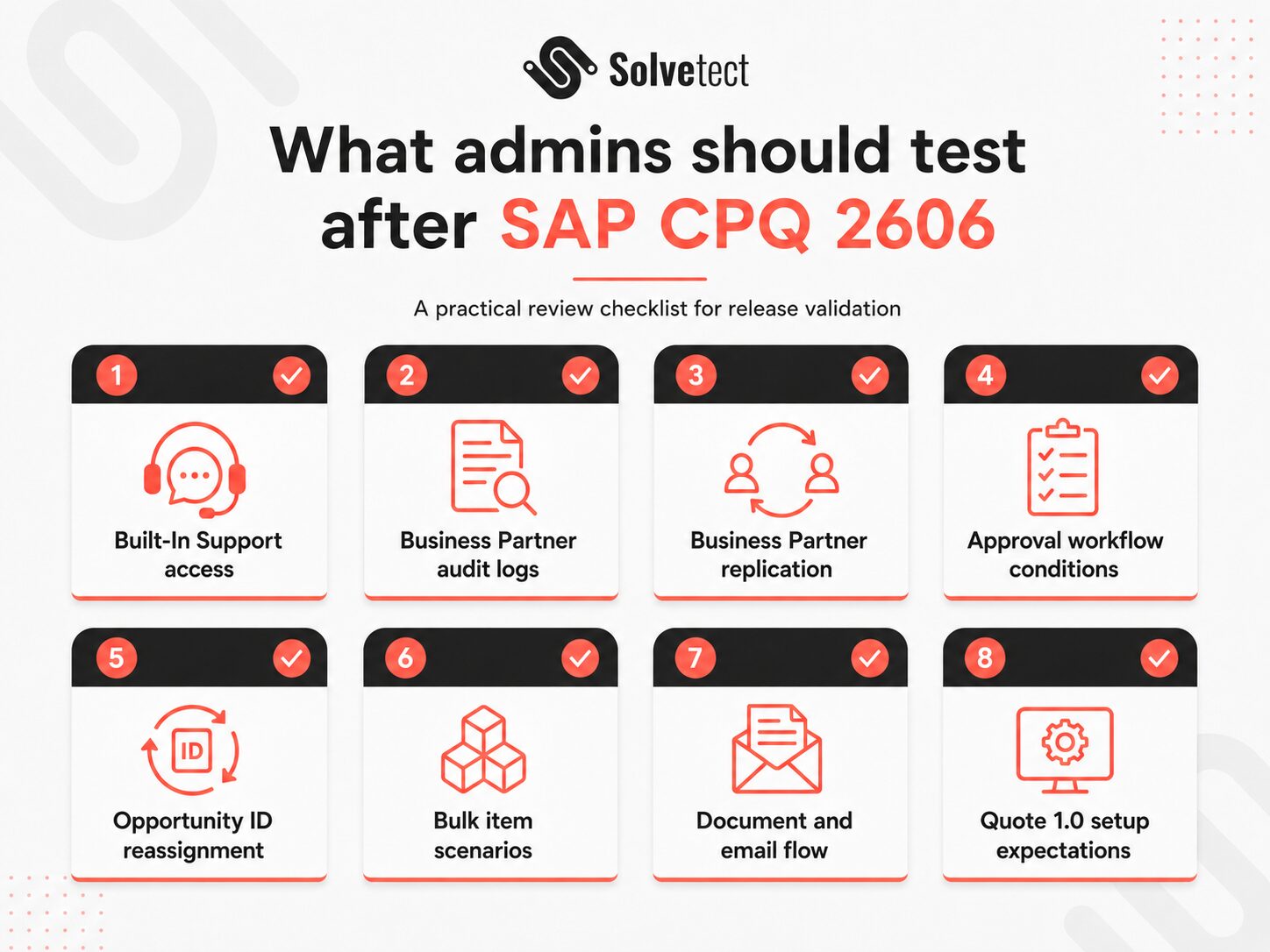
I would treat SAP CPQ 2606 as a release that deserves a focused, practical test plan. Not a dramatic project. Not a full reimplementation. Just a clean review of the areas most likely to affect admins and business users.
- Confirm Built-In Support access: check where it appears, which admins can use it, and how it fits your support process.
- Review Business Partner audit logs: verify that custom field changes are logged cleanly after API updates or replication events.
- Test Business Partner replication: especially if custom post exits are active in your integration flow.
- Retest approval workflow conditions: especially where
ApprovalRule.IsViolatedis used. - Check quote reassignment: confirm that Opportunity ID continuity behaves correctly in your business scenarios.
- Test bulk item scenarios: use realistic quote sizes, not only small test quotes.
- Validate document and email flow: especially for users on slower connections or remote setups.
- Review Quote 1.0 setup expectations: the configuration preview with quote context has been removed from Quote 1.0 setup because it applies only to the new engine.
This kind of checklist is also a good input for future release readiness planning, and it slots into the wider SAP CPQ release notes routine we run with clients. The more structured your internal testing becomes, the less each SAP CPQ update feels like a surprise.
Final thought
SAP CPQ 2606 is a small release with useful admin value. Built-In Support is the clear headline, but the deeper value is in cleaner logging, better integration behavior, approval workflow fixes, reassignment continuity, and improved stability in everyday quote operations.
I would not oversell it. This is not the release that changes the business case for SAP CPQ. But I would not ignore it either.
For SAP CPQ admins, the best response is simple: review the release notes, compare the fixes against your current pain points, test the affected areas, and update your internal support process where needed.
Good SAP CPQ administration is not only about building the system. It is about keeping it reliable after real users, real quotes, real integrations, and real edge cases start doing what they always do: making life interesting.
If your SAP CPQ environment is already complex, especially with Quote 2.0, integrations, approval rules, or custom post-processing logic, this is a good moment to run a focused review. Solvetect can help assess what changed, what matters in your landscape, and which items deserve testing before they become support tickets.